Prior Authorization Isn’t Just a Payor Problem. It’s a Workflow Problem.
Prior Authorization Isn’t Just a Payor Problem. It’s a Workflow Problem.
Introduction:
Imagine a patient arrives at a behavioral health facility, and the care team recommends a specific level of treatment. The clinical decision is clear: the patient needs care, the provider is ready, and the clinical need is documented.
Then someone asks six words: “Do we need prior authorization?”
It sounds simple, but the answer is rarely a quick yes or no. The answer depends on the patient’s insurance, their specific plan, the service requested, the facility location, who provides it, and details like service units or frequency.
Prior authorization is more than just an insurance requirement—it is a complex healthcare workflow problem.
One Diagnosis. Four Different Paths.
It is easy to assume that two patients with the exact same diagnosis receiving the exact same treatment will follow the same path. But insurance rules don’t work that way.
- Patient 1: Needs prior authorization immediately.
- Patient 2: Does not need authorization at all.
- Patient 3: Needs authorization only after a specific threshold (like 5 days or 10 treatment units).
- Patient 4: Needs authorization based on the specific provider or care location.
Because of this, a basic formula like Diagnosis + Service = Prior Authorization Required fails in the real world. Diagnosis alone does not determine the workflow.
What Actually Happens Behind “Waiting for Authorization”
When a patient is told “We’re waiting for authorization,” they imagine a quick form submission. In reality, the care team is juggling an entire 16-step administrative process behind the scenes:
- Verify patient coverage.
- Identify the exact payor and plan.
- Confirm requested service details.
- Check whether authorization is required.
- Identify plan-specific rules.
- Determine required clinical and administrative data.
- Locate records across patient charts.
- Identify missing documents.
- Prepare the request packet.
- Submit through the correct portal or channel.
- Monitor request status.
- Respond to payor requests for additional info.
- Record the approval decision.
- Track allowed dates, units, and limits.
- Monitor ongoing care against limits.
- Start reauthorization before care expires.
Where the Workflow Breaks Down
The issue isn’t that staff aren’t working hard—it’s that information is scattered across completely separate systems:
- EHR System → Clinical notes and patient records
- Payor Portals → Rules and submission forms
- Scheduling Software → Holding appointment dates
- Spreadsheets & Emails → Manual tracking and status updates
When staff have to constantly switch between these tools, delays happen. Requirements are caught late, wrong forms are sent, missing documents trigger rejections, and nobody knows the exact status.
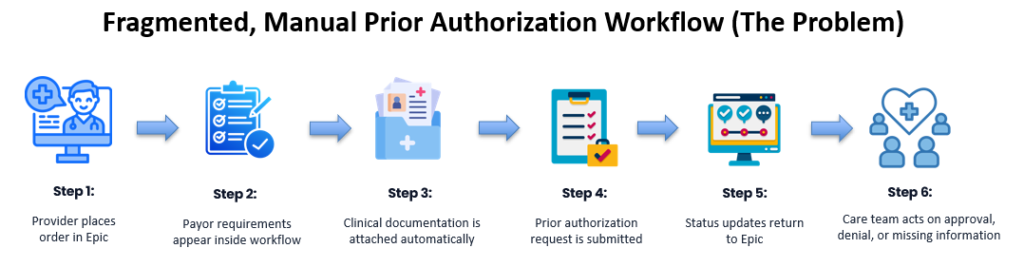
When systems are disconnected, staff spend time coordinating tools instead of helping patients.
Why Electronic Prior Authorization (ePA) Isn’t Enough
New electronic prior authorization tools and CMS (Centers for Medicare & Medicaid Services) API requirements help send requests faster. CMS tools like Coverage Requirements Discovery help check if authorization is needed, but that check is separate from the actual authorization submission and ongoing management.
Electronic submission replaces paper faxes, but it doesn’t automate the internal work. Someone still needs to organize records, spot missing files, handle exceptions, and monitor expiration dates.
A Smarter 8-Step Authorization Workflow
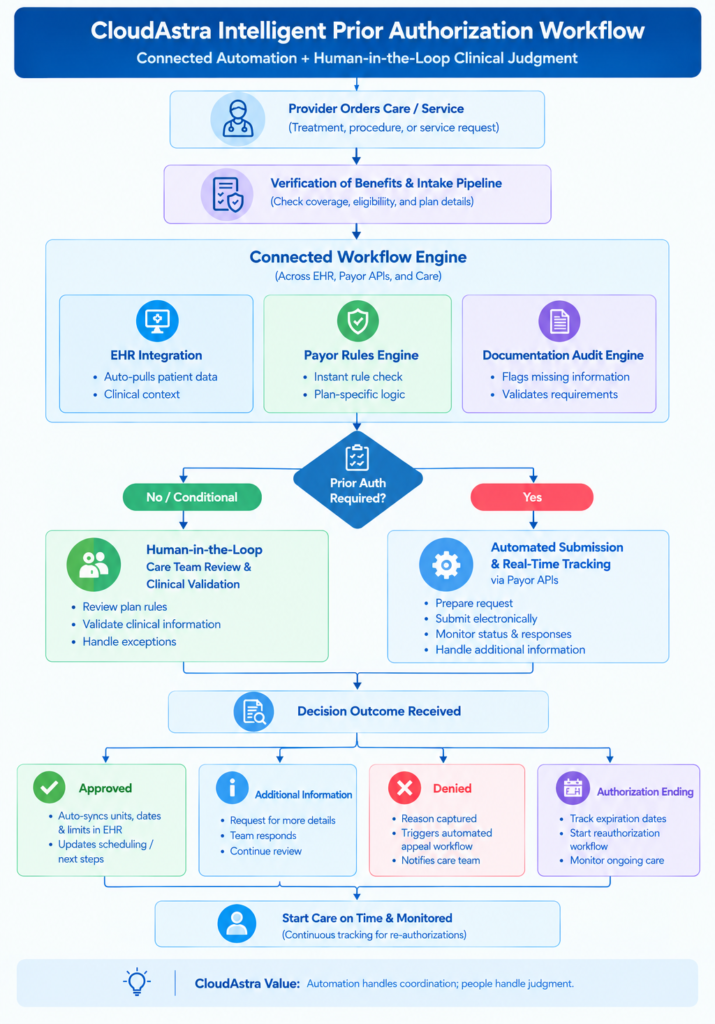
Instead of asking only “Does this need authorization?”, a smart workflow looks at the complete picture:
- Understand the Patient: Pull active coverage and clinical history.
- Understand the Request: Identify diagnosis, setting, provider, units, and frequency.
- Understand the Plan: Identify exact payor and plan coverage rules.
- Determine Requirements: Instantly check if authorization is Not Required (care continues), Required (gather docs), or Conditional (check criteria).
- Gather Existing Records: Automatically compile relevant EHR notes.
- Spot Missing Data Early: Flag missing files before submitting to prevent instant payer rejections.
- Submit & Track: Send requests electronically and automatically monitor for status updates.
- Manage Beyond Decision: Record approval numbers, track unit limits, and trigger reauthorization before care expires.
The Human-in-the-Loop Model
Smart technology isn’t meant to replace doctors or administrative teams—it supports them.
- What Automation Does: Checks rules, pulls records, flags missing data, tracks portal updates, and routes cases.
- What Healthcare Teams Do: Applies clinical judgment, handles unclear payer requests, reviews exceptions, and manages complex patient care.
Why This Matters for Overall Healthcare Operations
Prior authorization delays ripple across the entire healthcare facility:
- Scheduling: Appointments sit on hold.
- Clinical Care: Patients wait for treatment.
- Staff Efficiency: Teams waste hours manually checking portals and emailing updates.
- Leadership: Executives lack visibility into where requests are stuck.
Fixing authorization connects and streamlines related operations like verification of benefits, patient intake, utilization review, referrals, and ongoing care coordination.
Conclusion & Where CloudAstra Fits
Prior authorization starts way before a form is submitted to an insurance company. It starts with understanding who the patient is, what plan they have, and what steps are needed next.
At CloudAstra, we look at prior authorization as a complete workflow across people, systems, information, and decisions. By connecting your EHR, payor rules, clinical documentation, and scheduling into a single workflow layer, CloudAstra gives your care team full visibility—reducing administrative friction and keeping care moving forward.
CloudAstra helps healthcare organizations connect people, data, systems, and intelligent workflows to reduce administrative complexity and keep care moving.
Contact Us:
Let us innovate together. If you are interested in exploring this further contact us at https://cloudastra.ai/contact-us